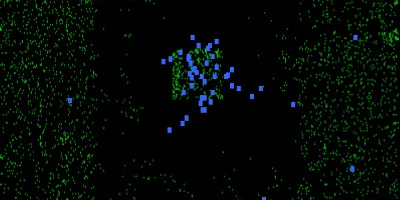
A simple set of rules lets you simulate evolution on the hypothetical planet of wator.


Wa-Tor is the name of a computer simulation of a simple predator-prey model set in a toroidal world. The simulation was originally described by Alexander K. Dewdney in an article for Scientific American [1]. It simulates the hypothetical toroidal planet Wa-Tor (from "Water Torus"), whose surface is entirely covered with water. Only two species inhabit this ocean: sharks and their prey fish. The sharks survive solely by hunting fish, while the fish feed on a never-ending supply of plankton. Sharks and prey fish behave according to a strict, fixed set of rules. Over the course of the simulation an interesting dynamic emerges, with the populations oscillating between extinction and overpopulation.
Pixel Size Prey Breed Time Energy per Prey Min shark spawn energy Chart SkipThe simulation can be influenced by changing the following parameters:
| Parameter | Meaning |
|---|---|
| Pixel Size | Edge length of a simulation cell in screen pixels. Smaller values produce a finer grid with more individuals but also higher computational load. Changing this value resets the simulation. |
| Prey Breed Time | Breeding interval of the prey fish in ticks. Each fish is assigned a random maximum age at birth from the range [1, breedTime + 300]; on reaching that age it splits (offspring spawned at the old position, age counter reset to 0). Smaller values → faster fish reproduction. |
| Energy per Prey | Energy gained by a shark for each fish eaten. Sharks lose 1 energy per tick and die at 0. Higher values make sharks longer-lived and more dominant. |
| Min shark spawn energy | Energy threshold above which a shark reproduces. When exceeded, the energy is split between parent and offspring. Smaller values → more frequent reproduction and higher oscillation frequency. |
In this section we will briefly cover the simulation rules. Simulation time advances in discrete time steps. The toroidal world is simulated on a two-dimensional grid whose opposing edges are connected. When an individual leaves the simulation area on one side it re-enters on the opposing side. Fish and sharks move in every time step (if possible) and interact according to the rules described below.

In every time step a prey fish moves randomly to one of its four neighbouring cells, provided that cell is empty. Fish age with every time step. Once a fish reaches a certain age (the "breed time"), its life ends with the creation of two offspring. The age counters of both offspring are reset to zero. One offspring takes the cell of the old fish, the second is created randomly in a free neighbouring cell. If no neighbouring cell is free, no further offspring is created. The descendants then go through the same life cycle.
The image on the left highlights the prey's movement options with arrows. Fish are not allowed to move into cells already occupied by sharks. If none of the neighbouring cells is free, the fish does not move.
Summary of rules for prey movement:
Sharks move randomly to neighbouring cells. Each move costs the shark one point of energy. If a shark's energy level drops to zero it dies. If the neighbouring cell into which the shark moves contains a fish, the fish is eaten and the shark is credited with a fixed amount of energy. To survive, a shark needs regular hunting success. As soon as a shark has accumulated enough energy it can spawn an offspring in a neighbouring cell. The offspring receives half of the parent's energy. The parent's age counter is reset on reproduction.
Summary of rules for predator (shark) movement:A few changes to the algorithm were made to improve simulation performance. In the original algorithm sharks do not move randomly; they specifically target neighbouring cells containing fish. This movement pattern has been simplified here to speed up the simulation. The modification is minimal, so there is no visible difference compared to the original. Alexander K. Dewdney's implementation resembles a cellular automaton. In such an implementation every cell must be tested individually, even when it is empty, which reduces simulation speed. The implementation used here therefore stores shark data in a linked list. As a result, the algorithm only has to deal with individuals that actually exist.
 Population size over time.
Plotting the number of individuals of both species in a diagram yields a curve characteristic of the Lotka-Volterra equations. This behaviour is described by two differential equations.
Although the solution of these differential equations exhibits periodic behaviour, it cannot be expressed in terms of normal trigonometric functions. A simplified linearised solution shows, however, that the predator-population curve leads the prey curve by 90 degrees. A more detailed description of the information presented here can be found in the Wikipedia article on the Lotka-Volterra differential equations [3].

This article is now more than 20 years old. Originally the simulation was implemented as a screensaver for Windows. Such programs used to be far more widespread than they are today. Their original purpose was to prevent a static computer image from burning into the CRT monitors used at the time. By now they are largely obsolete and have become a niche product. Modern monitors are no longer affected by this problem and are in any case usually switched off automatically by the operating system for energy-saving reasons.
Be that as it may, the original screensaver can still be downloaded. It is written in C++ and the graphics output is rendered in 2D using the OpenGL library. The fundamentals of programming screensavers with MFC and OpenGL are described and summarised very well by Rachel Grey in [2]. The source code of the Wa-Tor screensaver can be downloaded from GitHub and compiled with Visual Studio.
A Windows screensaver is an executable file with the extension "*.scr". In addition, a screensaver must implement a fixed set of command-line parameters. These parameters allow the screensaver to be configured or executed.
| Command-line parameter | Screensaver action |
|---|---|
| /P:### |
Starts the screensaver in preview mode. ### is the placeholder for a window handle (HWND) that should be used as the
parent window. The screensaver runs inside this window. This option lets you display the screensaver inside any Windows window.
|
| /C:### | Opens the configuration dialog. If the placeholder ### is not present, the return value of
GetForegroundWindow() is used as the dialog's parent window.
Otherwise the content of the placeholder "###" is interpreted as a decimal value representing a window handle to
be used as the parent of the dialog.
|
| /S | Starts the screensaver in full-screen mode. As soon as keyboard or mouse activity is detected, the screensaver terminates. |
After installation, the settings can be changed via a right-click on the Windows desktop. Installation is done by moving the EXE file into the windows/system32 folder. There is no separate installer. The configuration dialog can be found in the display options (right-click on the desktop). It allows you to set the parameters described below.
All parameter changes are reflected immediately in the preview window. The following table lists the available parameters:
| Parameter | Description |
|---|---|
| Prey breed time | The number of time steps required before a predator can reproduce. |
| Energy per hunted prey | The amount of energy the predator gains from eating prey. With every time step the predator loses one energy point. Once the energy is depleted, the predator dies. |
| Energy to create offspring | The minimum energy required for a predator to reproduce. When reproducing, the energy is split between mother and child. Yes, that's right — reproduction occurs by division, because by a whim of nature there are no fathers on Wator. |
| Pixelsize | The size of an individual in pixels. The larger this value, the better the simulation performance. |
C++ Source Code for Visual Studio
To install the software, simply run the installer provided here. The screensaver runs on all Windows versions from Windows 7 onwards. The software is provided free of charge; use is at your own risk.

A simple set of rules lets you simulate evolution on the hypothetical planet of wator.
Simulate the chaotic motion of a pendulum under the influence of gravity and three magnets.
Runge Kutta vs. Euler — on the influence of time step sizes on the accuracy of numerical simulations.
John Conway's Game of Life is a cellular automaton that shows how a simple set of rules can generate complex self replicating patterns.