
An introduction to Benoît Mandelbrot's Wonderful World of Fractals.

The best software I never wrote
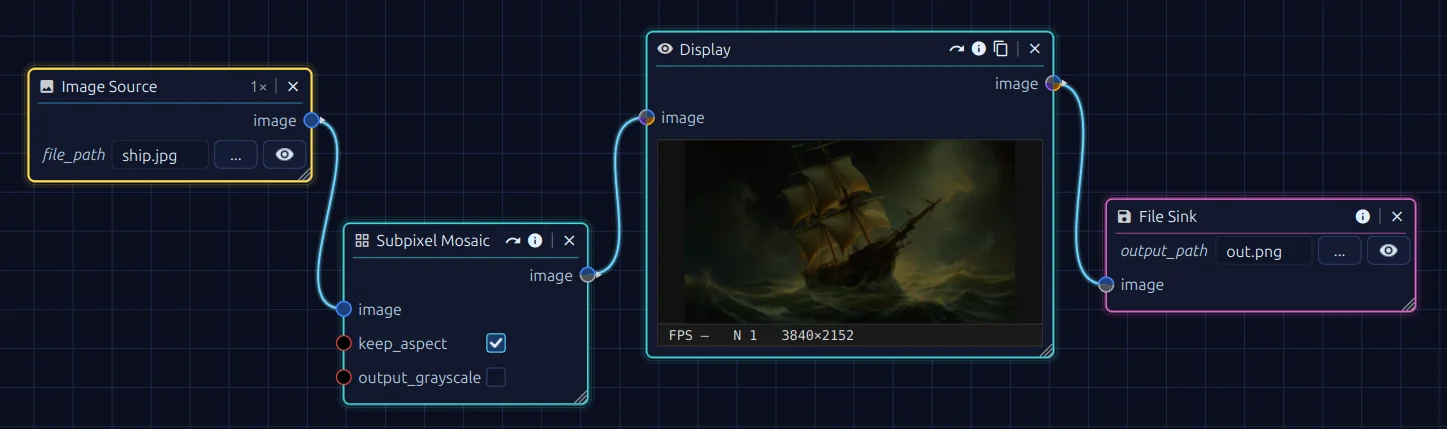 Stjörnhorn — a node-based editor for image, video and data processing. The entire project was built
uncompromisingly with AI assistance, for code, assets and documentation alike.
Stjörnhorn — a node-based editor for image, video and data processing. The entire project was built
uncompromisingly with AI assistance, for code, assets and documentation alike.
Every software developer has a stack of project ideas that never see the light of day. One of the projects on my stack is called OCVL. It was meant to stand for OpenCV Vision Library: a high-level wrapper around the OpenCV library for image processing. The library was supposed to do everything, from simple filter operations over the fully automated stacking of astrophotos to a camera-based data logger for digital displays of all kinds.
It could do all that, but what I could not do was finish the project and turn it into a reusable foundation. Once a problem like astro stacking or an OCR-based data logger is solved, it gets boring. The rest is API cleanup, writing documentation and building a user interface — anything but exciting. The opposite of fun. Tasks like that are what I do at work, not in my spare time. In the end I had the design idea of a node-based pipeline that lets you chain and extend filters and processing steps. What I did not have was the time to pull it all together into an application. Developing such a hobby project would drag on for years.
On the other hand, I had been wanting to write an article about generative AI anyway. So why not combine the two? This is the story of Stjörnhorn — the best software I never wrote.

Stjörnhorn is a node-based flow editor for processing images, videos and data. Prebuilt binary archives for Windows and Linux can be downloaded from GitHub.
The term vibe coding emerged in early 2025 and describes a way of writing software with large language models: you tell an AI assistant what you want, accept the generated suggestions largely unchecked, and only correct things where the result does not match your expectations. The goal is not to understand every line, but to translate an idea into running code.
"There's a new kind of coding I call 'vibe coding', where you fully give in to the vibes, embrace exponentials, and forget that the code even exists."
— Andrej Karpathy, February 2025
For many software developers, however, vibe coding is a repulsive concept. A process for automatically producing soulless, low-quality, ultimately unmaintainable code. Built on top of a system that was presumably trained largely on the source code of the "average programmer" on GitHub — but what if it actually works?
As mentioned above, the starting point is my unreleased OCVL library. That is 2500 lines of code across 32 Python source files that I worked on on and off over a total of 25 months. I mainly used it in projects for this website. OCVL code shows up in the Tourist Filter, in the infinite zoom effect, in an undocumented visual data logger and most recently also in the archive of the dithering article.
The plan was to use every form of AI assistance available — no restrictions, no regrets. The project was to be platform-independent, based on a simple Python stack, and feature a graphical node editor. I would only act as a project manager who dictates the architectural direction.
The implementation was carried out with Claude Opus 4.6 1M and 4.7 1M. These are models with a 1 million token context window. That matters, because when you send the AI a prompt, what is actually transmitted internally is not just the prompt itself, but also large parts of the previous conversation and relevant files from the project. The more context the AI has, the better it can understand and complete the task.
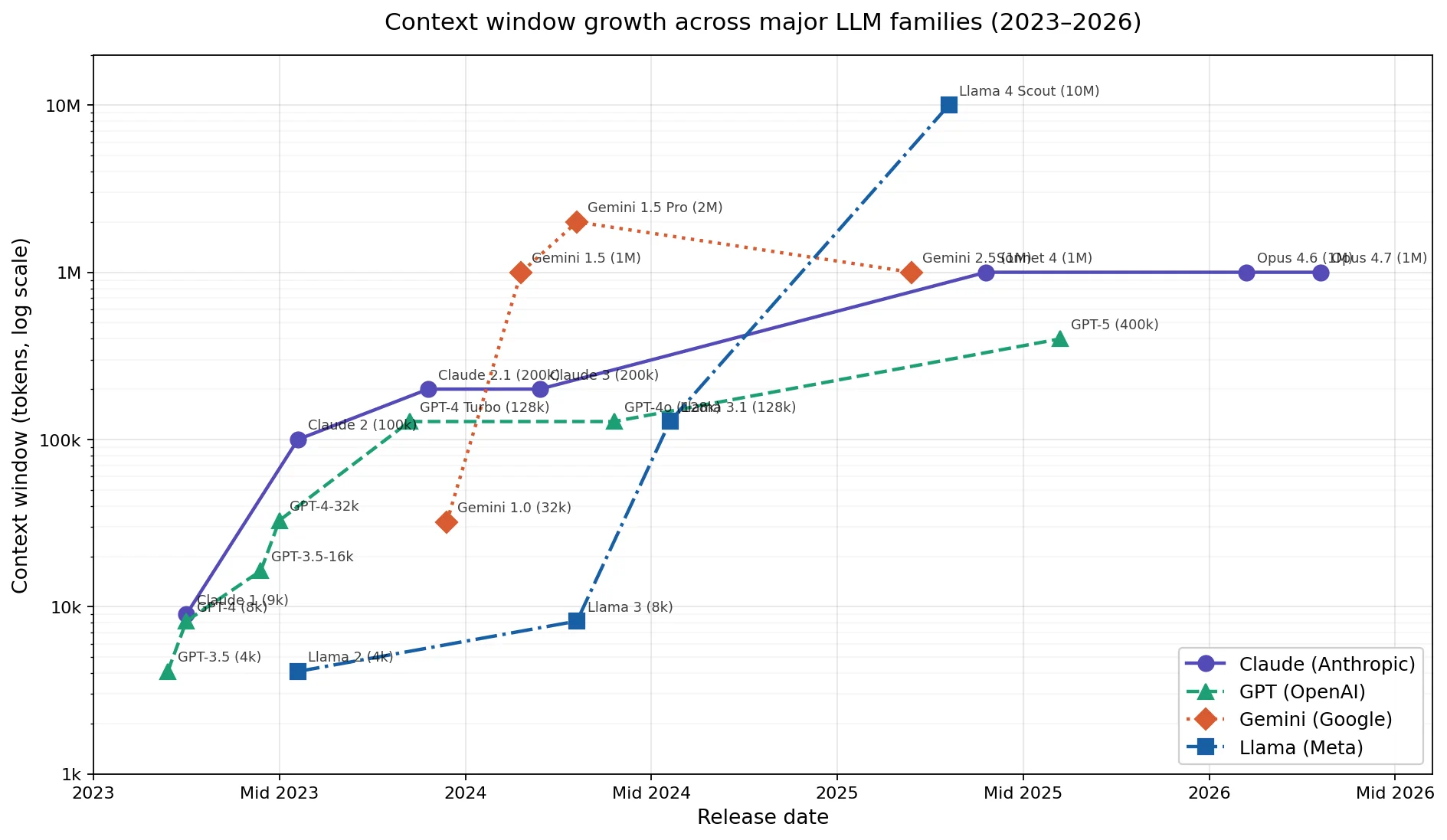 Growth of the context window sizes of various language models from 2023 to 2026. (Logarithmic X-axis scale.)
Today a million tokens of context still feels like a lot, but ChatGPT 3.5-turbo started out in 2023 with just 4096. In another two years, that will look small as well.
A language model is a tool, but also a coworker. It is important to assign it a role and to brief it properly. For Claude this is done via the Claude.md file. For this project, the AI was supposed to act as a software engineer and watch out for the maintainability of the source code on its own initiative. Over the course of development I also tasked it with writing the documentation and creating backlogs. The document kept growing as development progressed.
Always create a role definition and reference established programming principles such as
SOLID. An explicit pointer to it in
CLAUDE.md nudges the model toward clean, maintainable architecture, instead of picking
the lowest-effort copy-and-paste solution.
The AI's contributions were almost exclusively integrated into the project via so-called pull requests (PRs). That is, the AI did not work directly on the main branch but committed its changes on a separate branch. I would then review that branch and merge it into the main branch. This is an established process in software engineering. It had the advantage that I could keep control over the changes while still letting the AI work freely. Change requests were usually discussed directly with the AI.
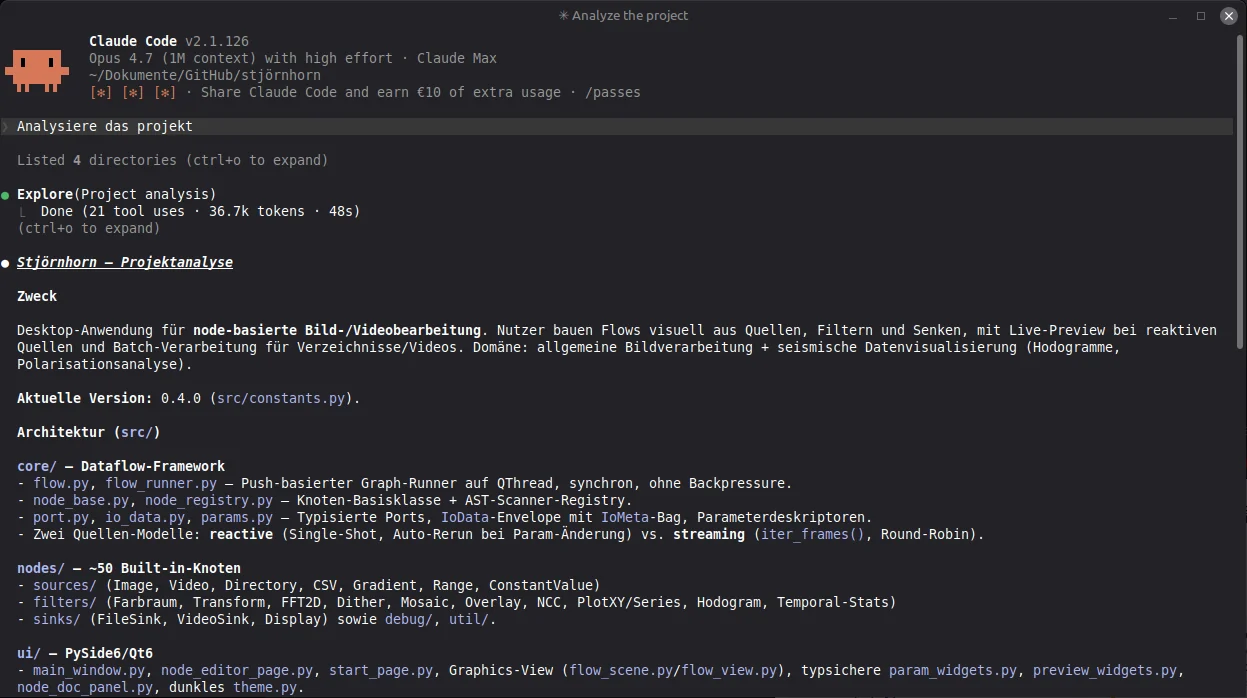 The Claude CLI is one of the ways to interact with the coding assistant. It has its advantages when
working locally — for instance, you can use it to compare two project directories.
The Claude CLI is one of the ways to interact with the coding assistant. It has its advantages when
working locally — for instance, you can use it to compare two project directories.
The project starts from an empty Git repository and inside the user interface of Claude Code. Most of the time I actually worked through the website. The CLI is convenient for local work, but I wanted to retain control over the development process and therefore committed to a workflow based exclusively on pull requests. That is technically possible with the CLI as well, but it would create branches and pull requests under my own account and could also accidentally push straight into the main branch.
Working with pull requests makes the origin of every change traceable and gives you, at least in theory, control over all modifications.
In practice you will quickly notice that the quality of the AI's contributions is very high and that you end up waving many changes through. This is definitely not the average programmer I had been expecting. It is a very strong programmer. One that, like a human developer, needs data to fix bugs. For that reason it is wise to instruct the AI to add a logger right from the start. With it, the AI can later trace program flow and gets the information it needs to systematically analyze problems.
Have the AI build a logger into the program from day one and also have it set up a crash handler for native-code crashes. When a bug appears, the log gives the AI exactly the context it needs to systematically analyze the issue.
To keep the complexity of the project under control, another standard software engineering practice is to schedule regular refactoring sessions. For that to work, you should have a test suite. An AI can write that too, and extend it fully autonomously.
Have the AI write unit tests for new features from the very beginning. In practice you only need to tell it once to set up a unit test framework, and add a note in its role file reminding it to write unit tests on its own. They are an important part of quality assurance and help avoid regressions. They also give the AI an example of how a function is meant to be used, which increases the likelihood that it will use that function correctly in the future.
What remains is to pick the technology stack and put the AI to work on the implementation. For Stjörnhorn, Python and OpenCV were a given. The UI toolkit was initially DearPyGui, but soon I switched to PySide6. All of this can be set up with a single prompt:
Create a new project based on Python, OpenCV and PySide6. It should
become a node-based editor for image and video processing, into which
my existing OCVL library can later be integrated.

In addition, set up the following quality assurance:

- A logger that writes important program events and errors to a log file.
- Handling for crashes in native code, so that those also end up in the log
  and I can later understand what happened.
- A unit test framework with initial tests for the core functionality.

In CLAUDE.md, record that new features must always be delivered with
matching tests.
That is not the original prompt, but it would do the job.
The plan was to build software for processing images and videos with a node-based editor. A kind of "Photoshop for nerds" that lets you put together complex image processing pipelines without writing a single line of code. The software was to be split into several modules, with each module representing its own page that you can switch between.
The modules in detail:
The AI was also supposed to create the program documentation and set up a simple CI/CD pipeline via GitHub Actions, because the project was to be automated as much as possible.
The project started out under the name "Image-Inquest" as a test, with the expectation that it would ultimately fail. However, the progress was astonishing from the start. I began with DearPyGui, a simple UI toolkit that is well suited to quick prototypes. It was chosen because it ships with a built-in node editor. I considered that crucial, since I did not trust the AI to implement one from scratch and did not want third-party components in the project. 124 commits and roughly 8 to 10 hours of development time later, the project looked like this:
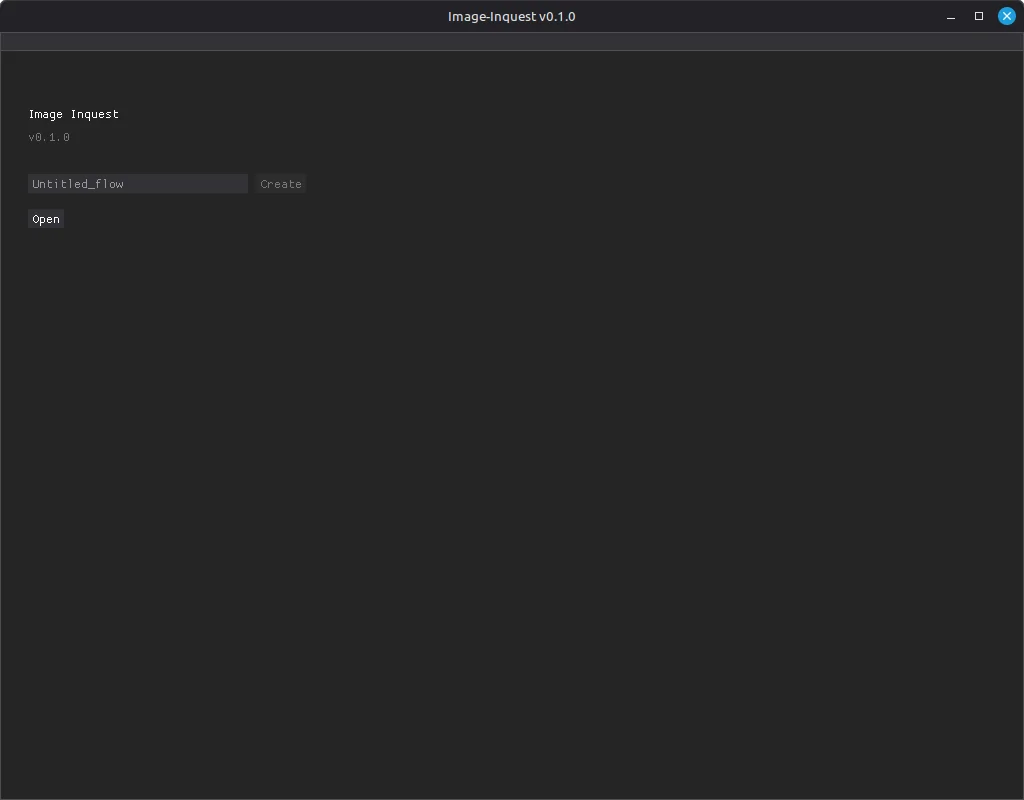 An empty start page, but the application framework with its module structure is already up and running.
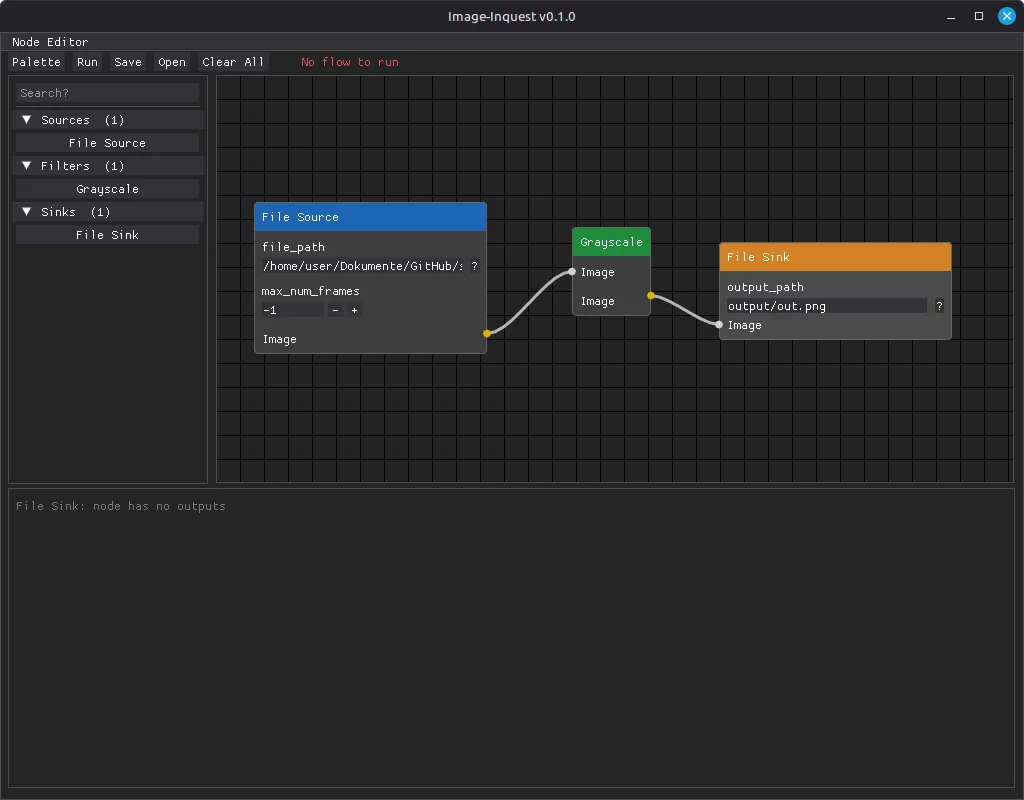 The first working prototype with DearPyGui: a node editor with node list and drag-and-drop, but
still no executable image processing pipeline.
The mythical Stjörnhorn — symbolic image for the sloppification of software development, or magical helper?
The first working prototype with DearPyGui: a node editor with node list and drag-and-drop, but
still no executable image processing pipeline.
The mythical Stjörnhorn — symbolic image for the sloppification of software development, or magical helper?
There was a working node editor with a node list from which elements could be dragged into the editor via drag and drop. Connections between processing steps could be created. The nodes were loaded dynamically and already contained working code that the AI had taken from the OCVL project and adapted. However, the processing steps themselves were still placeholders rather than fully functional.
Just to be clear: this was the state after a single working day. From this point on it was obvious that the project would not fail because of a lack of capability on the AI's side, because on this technological foundation the project could be developed further. It was also clear, however, that DearPyGui was running into its limits.
For that reason the UI was completely switched over to PySide6. Not by me — by the AI. It was a major change, since PySide6 does not come with a node editor, but the AI mastered this task as well and built a new one from scratch. It looked better than the DearPyGui version from the start and was easier to extend with the capabilities of the Qt library.
Now the project needed a new name. Through some detours, "Stjörnhorn" was chosen. Loosely inspired by Old Norse, it roughly translates to "star horn". It is an invented mythical creature that cannot really exist. I thought that fitting, and it had zero hits on Google...
At the time of writing this article, roughly 100 hours of development time have gone into the project. That is not a lot for a software project. Time to take stock.
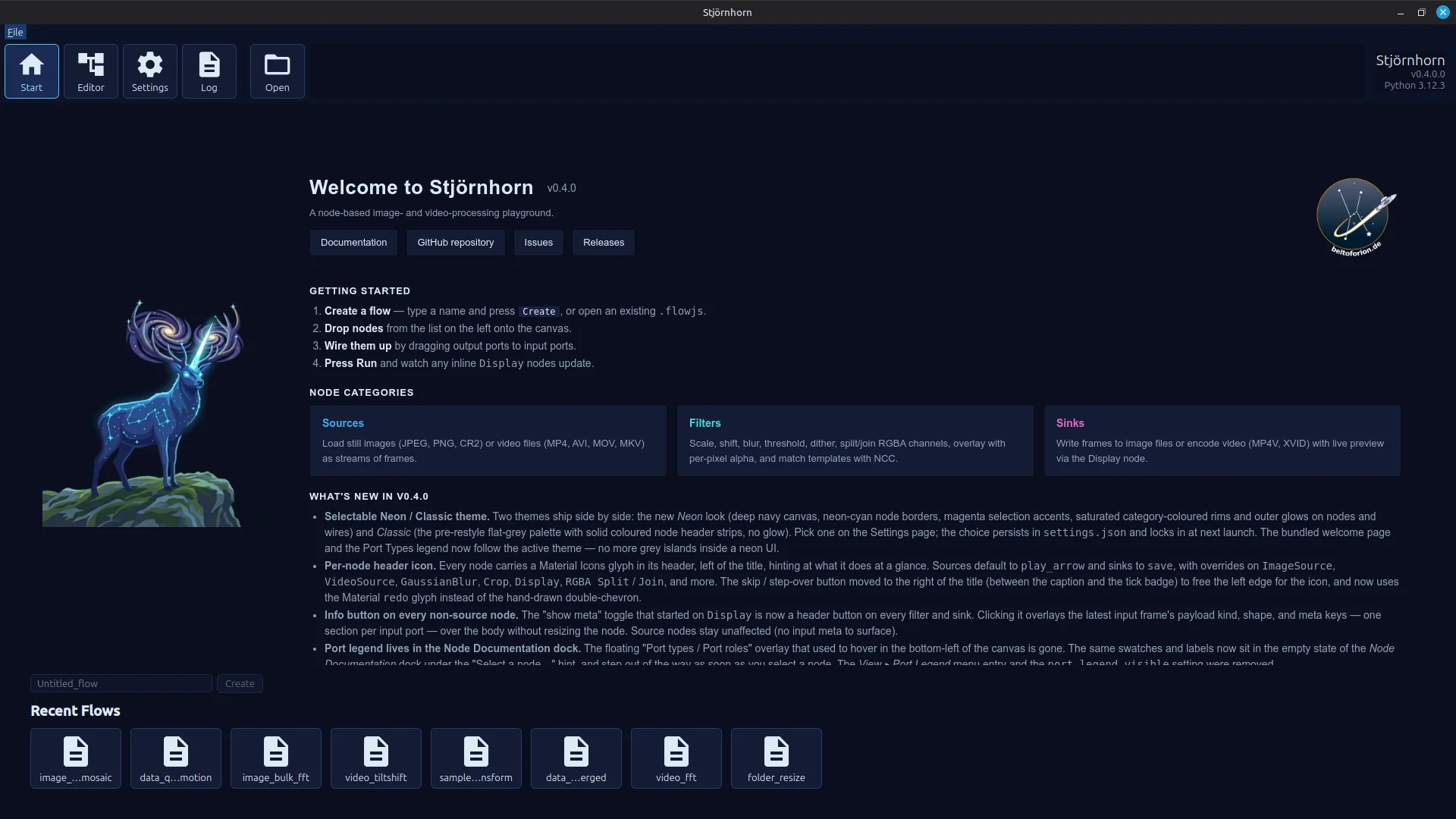 Start screen with recently used files list and a webview element for displaying short documentation.
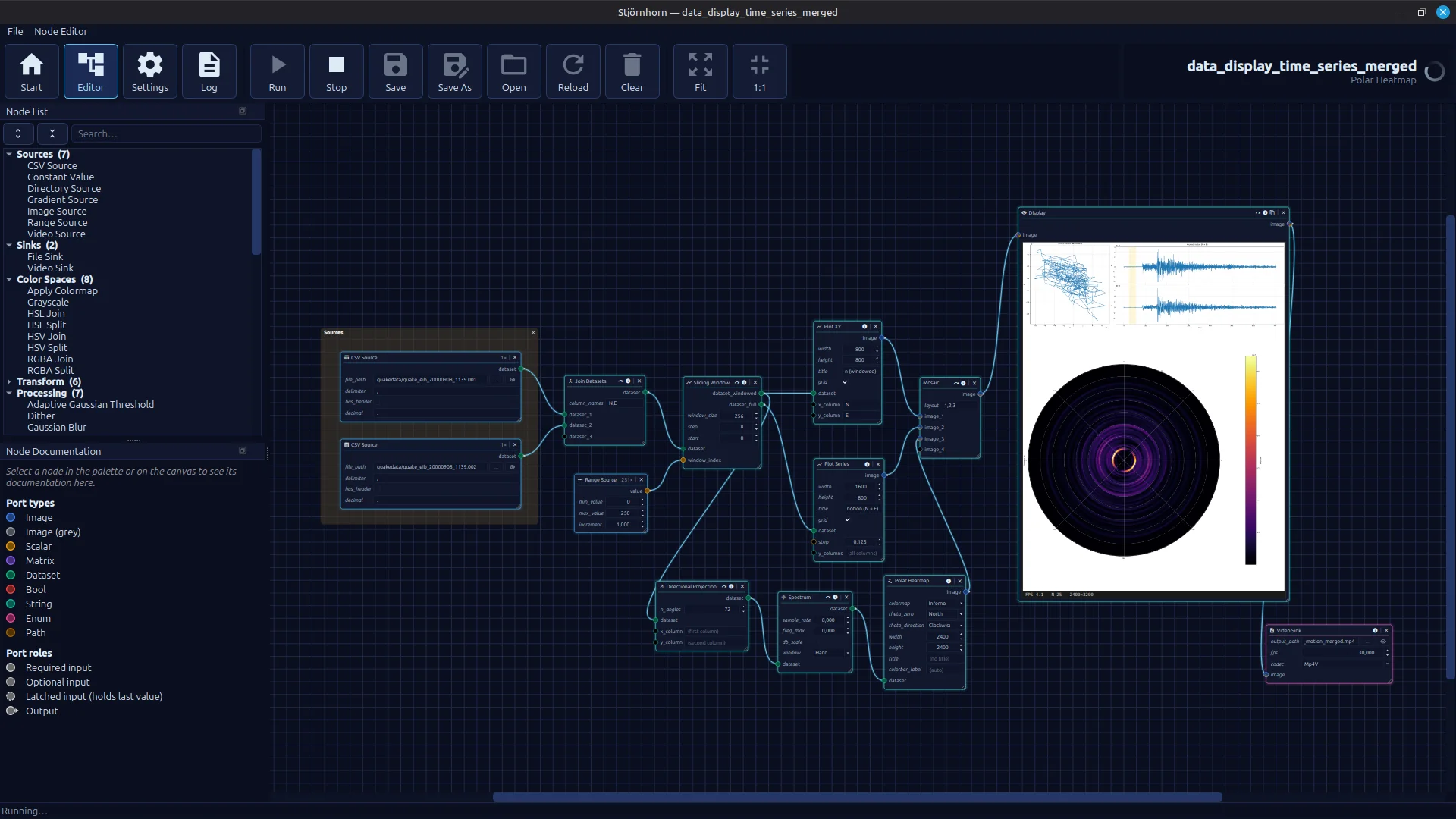 A working node editor with a wide range of executable pipelines. The image shows a hodogram derived from earthquake data
with an underlying spectral heatmap that visualizes in which direction the ground oscillates.
The whole thing is rendered out as a video.
A working node editor with a wide range of executable pipelines. The image shows a hodogram derived from earthquake data
with an underlying spectral heatmap that visualizes in which direction the ground oscillates.
The whole thing is rendered out as a video.
Each of the now more than 50 different nodes is documented. The documentation is shown when a node is selected. Additional functions in the header allow you to inspect data, for example, and you can disable nodes to skip individual steps in the pipeline. There are node parameters that act like constants, input ports and output ports. For every data type, there are dedicated UI elements for entering values. The ports now accept different data types: matrix, scalar, color images, grayscale images, and tabular data.
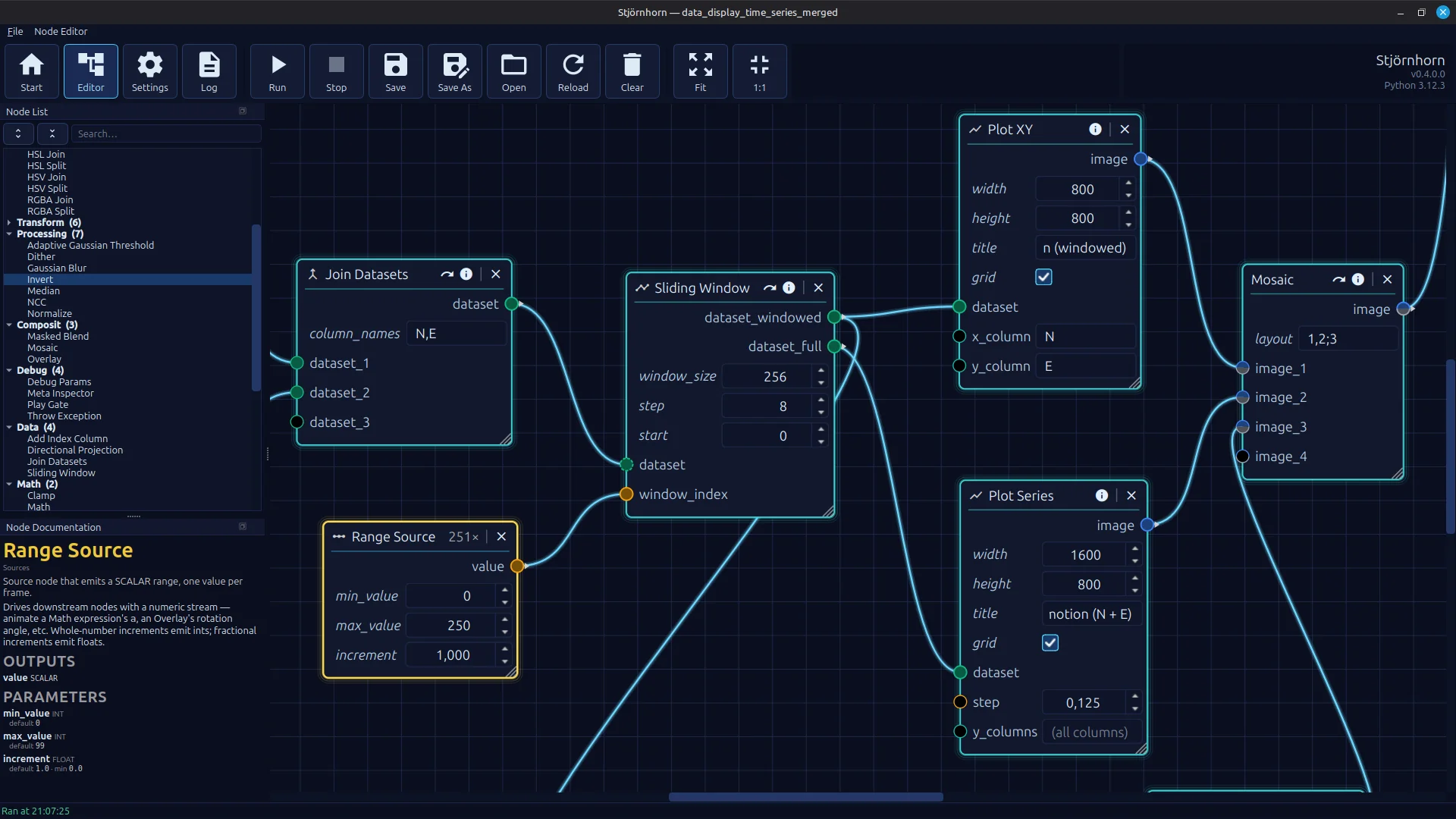 A working node editor with a wide range of executable pipelines. The image shows a hodogram derived from earthquake data
with an underlying spectral heatmap that visualizes in which direction the ground oscillates.
The whole thing is rendered out as a video.
A working node editor with a wide range of executable pipelines. The image shows a hodogram derived from earthquake data
with an underlying spectral heatmap that visualizes in which direction the ground oscillates.
The whole thing is rendered out as a video.
The user interface can be used with two different skins. The dark blue color scheme shown here is based on an AI-generated suggestion for the application's title image. The AI was simply asked to come up with a color scheme that looked similar.
Over the course of development, a number of bugs surfaced — all of them dealt with by the AI. It began with a hard, reproducible crash on Windows when clicking menu items. For experienced Qt developers this is no big deal. For me, in the role of "Vibecoder in Chief" without recent Qt experience, it would have been more involved. The AI tracked it down quickly using "caveman debugging" via log statements. I did not learn anything in the process.
The second problem was trickier. A sporadic, non-reproducible crash while running the image-processing pipelines. Again only on Windows. I had no starting point at all, but I hoped that post-mortem debugging would yield enough information to point the AI toward a fix. To that end, a crash handler was added on top of the existing logging (not by me, of course), so that at least some error message with an associated call stack would be captured.
Problems of this kind are nastier. They occur sporadically, and the horror that grips the vibe coder when he is faced with the prospect of having to understand the problem himself is very real. I was, however, dead set on not letting it come to that, and reached for the all-purpose weapon of vibe coding: copy and paste an unread crash report directly into the prompt with the unmistakable instruction: Fix this!.
It worked. The cause, apparently, was that numba, the just-in-time compiler used in Stjörnhorn, has to compile parts of the code on the main thread. That the AI figured this out surprised me. The fix was for numba to perform a warmup that compiles the code on the main thread before it is later executed on a different thread.
A few smaller problems followed, but nothing that could not be resolved with a "Fix this!" and an excerpt from the log file pasted into the chat window. I did not learn much from those either.
Let's take a look at the statistics after roughly 100 hours of development. Only 7% of the lines of code are attributed to me. Even that is misleading, because those lines almost certainly trace back to the source code of the OCVL library, which I dropped into the repository as a reference. It is passive code that is not actually used and only serves as a template. Subtract that, and my own contribution is at most 1 to 2%. I cannot remember directly contributing anything to the codebase. I did not want to be the programmer here either — I wanted to be the software architect.
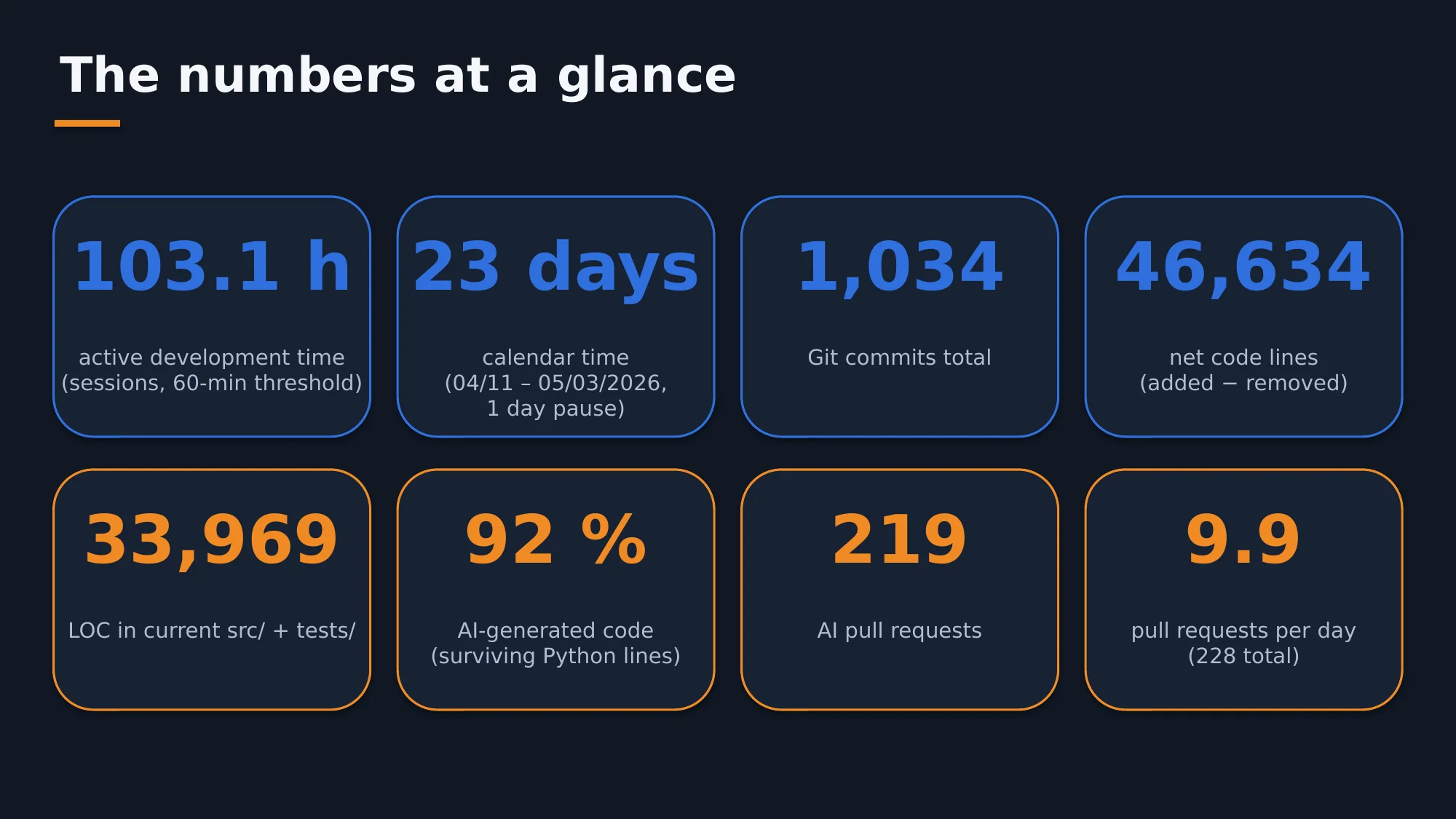 An overview of some of the project's basic metrics.
The result after about two weeks of net development time: 46,600 lines of source code produced net, of which 34,000 are still in the project. The AI created 219 pull requests, an average of 10 per day.
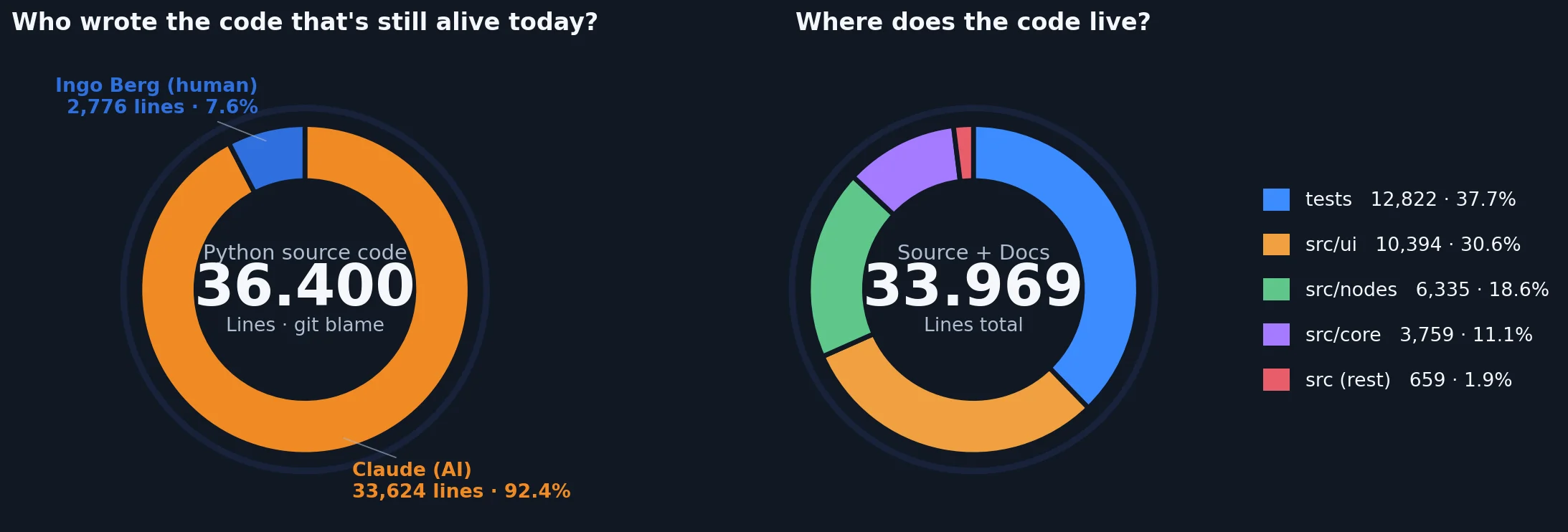 Who actually wrote the code, and how is it distributed across the project?
The cumulative net code growth shows high activity with rapid growth. Toward the end of the testing period, I shifted more focus onto refactoring. That explains the increase in deleted lines.
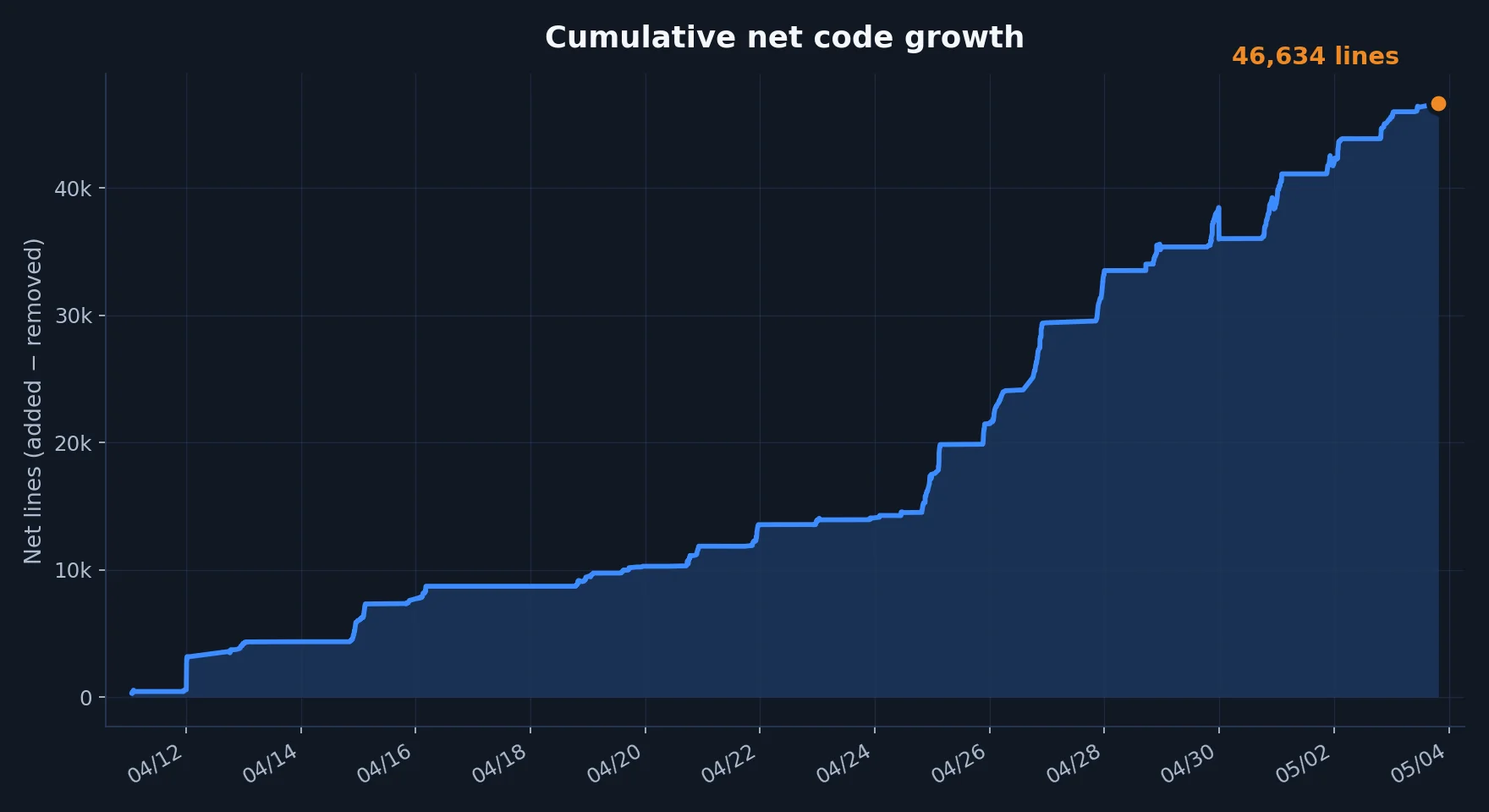 Cumulative net code growth over time. In the end not all lines remained in the project, since
lines were also removed during refactoring sessions.
Cumulative net code growth over time. In the end not all lines remained in the project, since
lines were also removed during refactoring sessions.
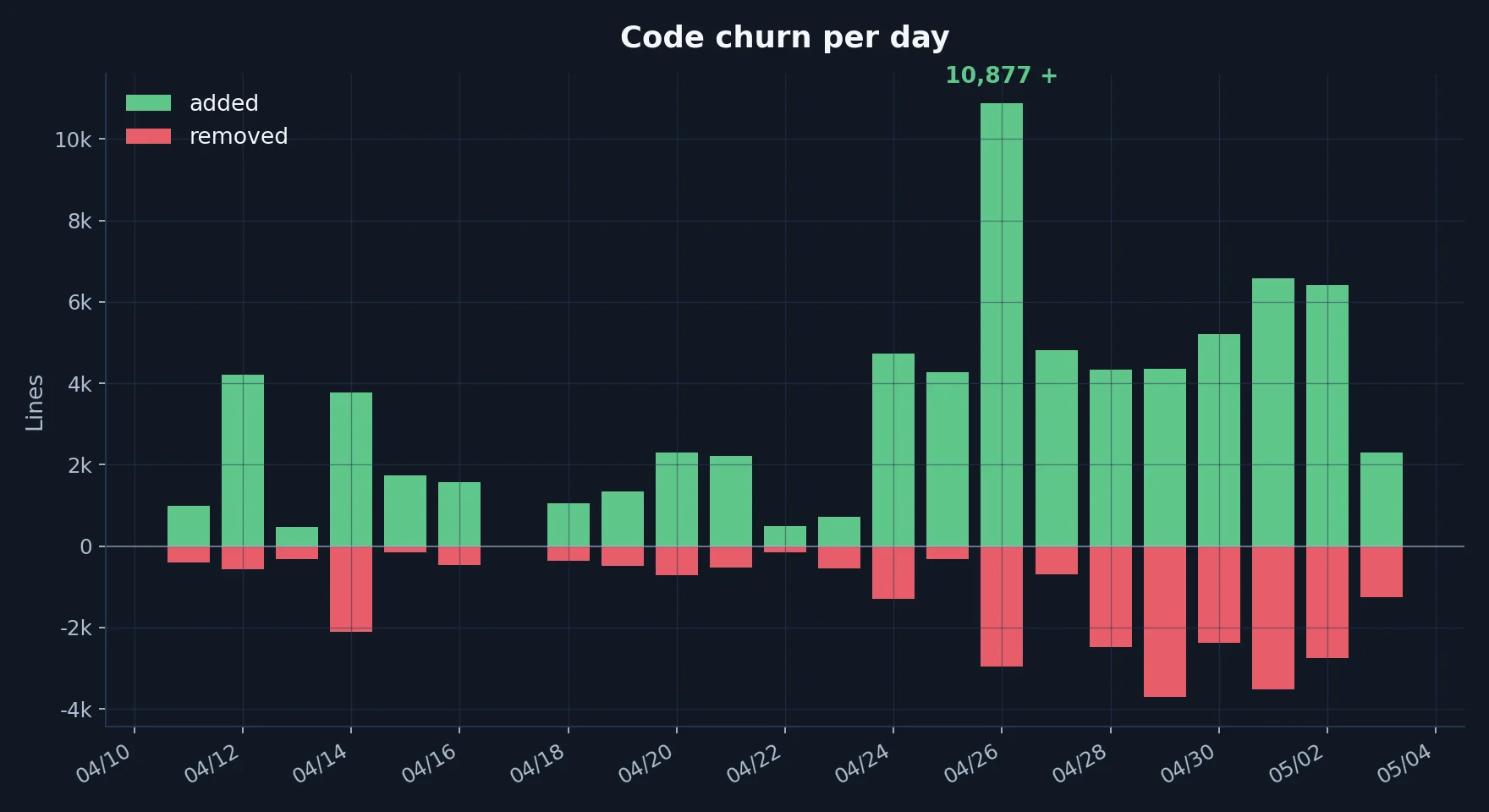 Code churn per day. Shows how many lines of code were modified each day.
Stability during development was achieved not least thanks to a comprehensive test suite that the AI extended on its own. There are over 760 unit tests, all of which run automatically whenever the AI generates source code. I explicitly requested about 3 of those tests; the AI created the rest on its own initiative.
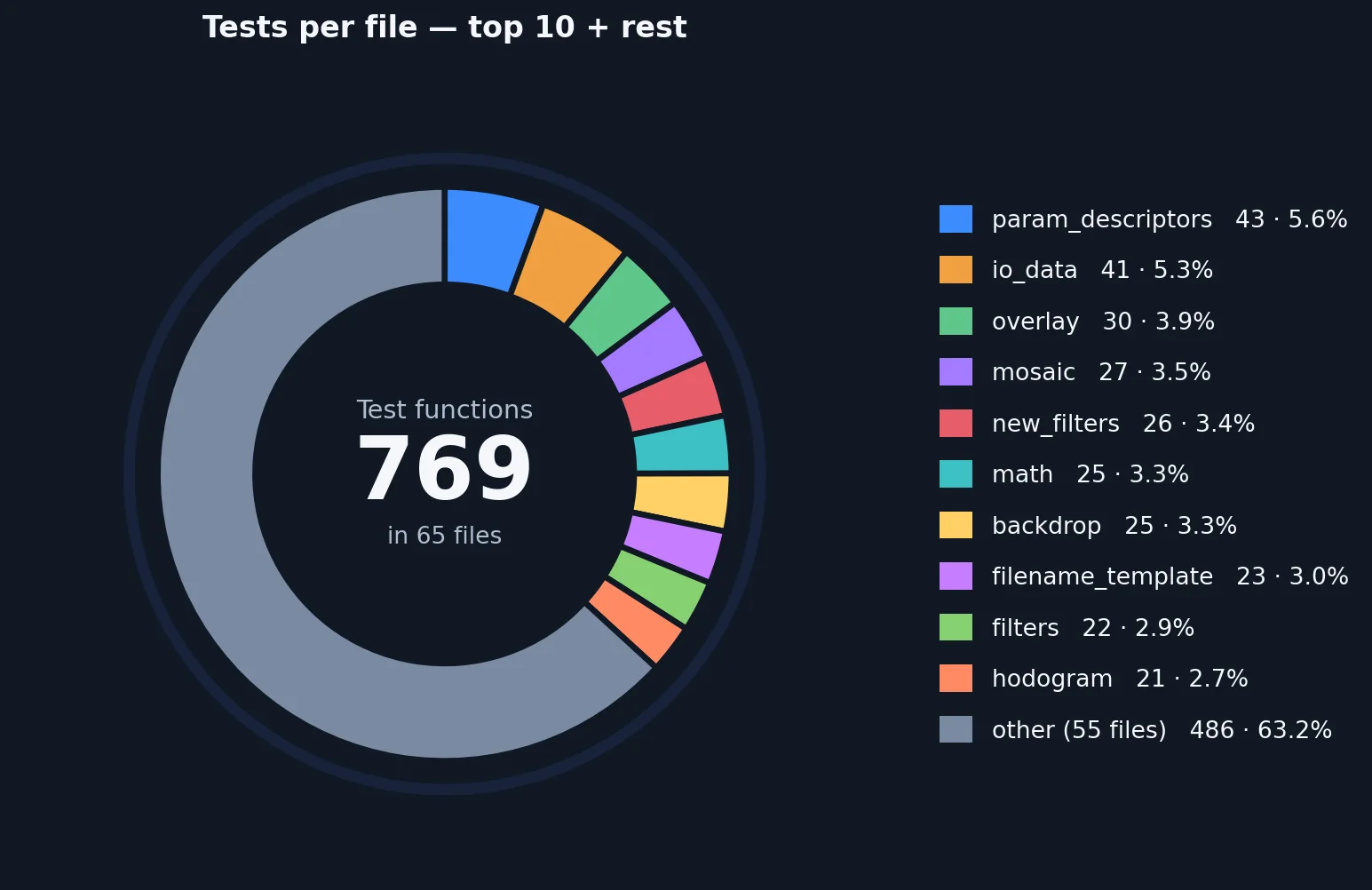 Test suite overview. Shows the number of unit tests and how they are distributed across the source code.
What I did here was more of a "supervised" kind of vibe coding, and that can work. The current state of the project is, in terms of UI and UX, better than what I could traditionally have built in the same amount of time. The time I saved on programming could be invested in UX design, without having to worry about the craftsmanship of the implementation.
Throughout development I kept waiting for the moment when the AI would lose track and hand me a codebase so unintelligible that I could no longer maintain it. That did not happen. On the one hand, it never lost track; on the other hand, I made sure to at least keep the architecture clean. I do not know the Stjörnhorn codebase down to every detail, but I understand the architecture and the basic flow of things. Even so, I believe it would take me a substantial amount of effort to gain a complete overview of every part of the software.
Software has a life cycle, and at its long end lie continuous maintenance and constant extensions. The AI generates bad code just as quickly as good code. It is exhausting, however, to constantly review large amounts of machine-generated code, and over time you will start waving the changes through unseen. That is a danger, because whoever does so will end up with a codebase that is unmaintainable for human and machine alike.
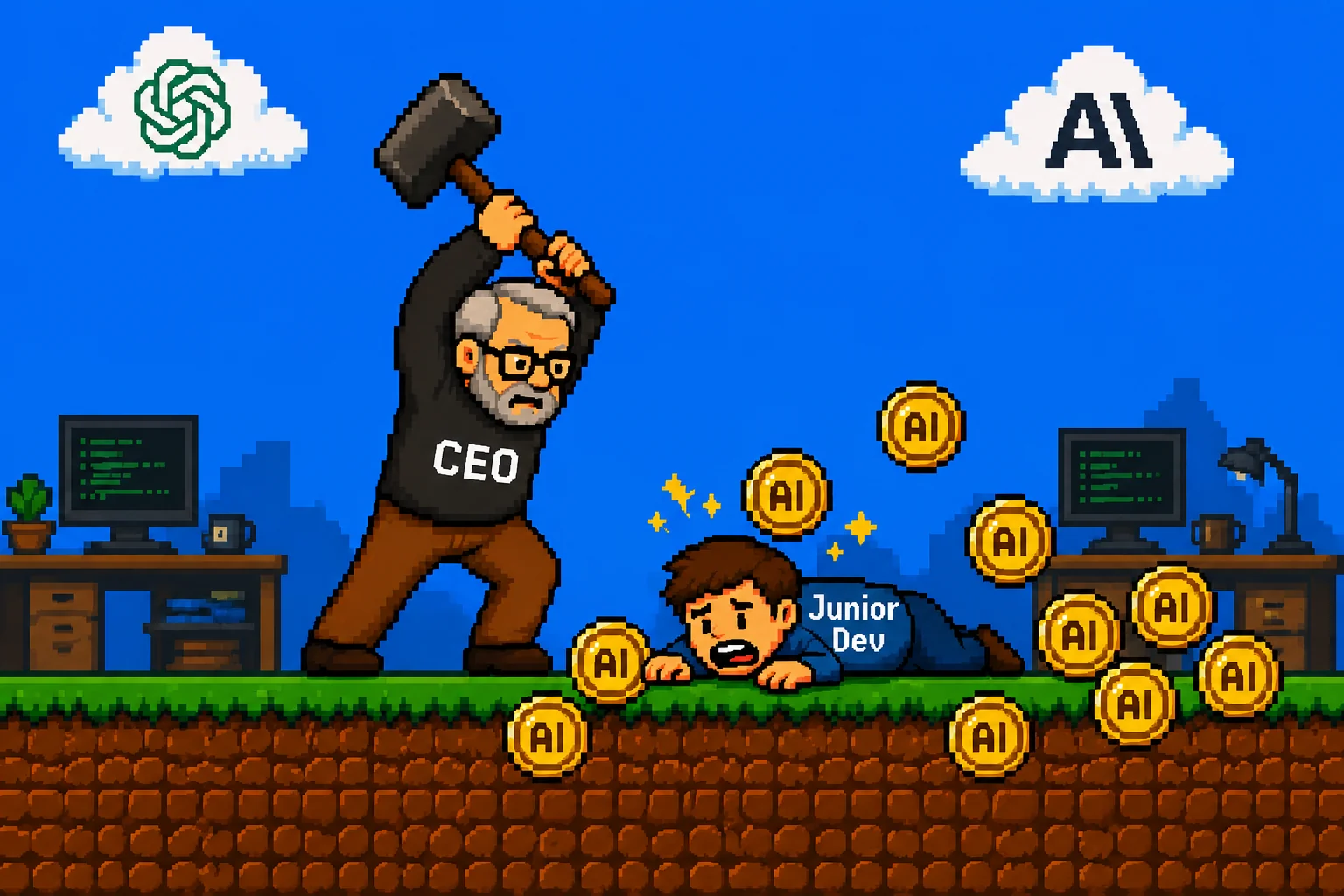 A symbolic image, but probably not far removed from the thinking of many software project managers. How many tokens do I get if I cut the junior programmer?
Let's look at the costs. The currency in which you pay for AI is the token. A token corresponds roughly to one short word. The price of a request is determined by its data volume. This consists of the request itself and the context delivered along with it. The context contains the entire conversation so far, but also large parts of the source code needed to work on the problem.
The AI model used here was Anthropic's Claude Code with the Max subscription. This subscription offers 5 times the token volume of the standard subscription. With it, I could work without restrictions. It is safe to assume, however, that despite their comparatively high price (about 100 euros per month), these subscriptions are subsidized by Anthropic in order to gain market share.
In tests in a professional environment (OpenAI Codex) with a project far larger than Stjörnhorn, the included volume of a standard subscription was used up in less than an hour with only a few requests. For a large project, my estimate is additional daily costs of at least 30-100 euros per developer just for tokens. On a normal working day, I went through 18 million tokens, for example. This can quickly become a significant cost factor.
The new tools are multipliers that have a stronger effect on experienced programmers, because a poorly phrased question consumes just as many tokens as a well-aimed one. That is why, in the immediate future, AI-assisted software development will have a negative impact on the prospects of entry-level engineers. Managers will look at every junior programmer and see nothing more than a walking token budget that can be freed up by not hiring. But whoever now prevents new software developers from gaining experience will, in two years, have no one left who can still keep track of a gigantic amount of AI-generated code.

An introduction to Benoît Mandelbrot's Wonderful World of Fractals.

How to create animations of the night sky with Python and Stellarium automation.
Nuclear chain reactions in gun type atomic bombs - How did the Hiroshima Bomb work?
A simple set of rules lets you simulate evolution on the hypothetical planet of wator.