
Learn how to create a colored version of the Siepinski-Triangle and many other fractals with recursive function calls.

OpenAI's GPT-4 as a ghostwriter for fully automatic article generation
 Image generated by OpenAI's Sora. Prompt: "Draw an image of a robot working at a lab bench, surrounded by books and papers. The robot is holding a tablet or laptop computer. In the background, there is a whiteboard with scientific equations and diagrams. Shiny futuristic world; bright futuristic office; lens flare; Window in Background"
The "Dead Internet Theory" claims that today's internet is largely empty and artificial. Most interactions, especially in social networks, take place between bots: generated content, generated clicks, generated likes. Why? To make money with advertising, affiliate links, and the sale of data.
"AI will not replace you, but the person using AI will."
It is therefore time to see how well an AI can replace me, because this article is about the fully automatic generation of web pages including images by means of artificial intelligence.
The Ghostwriter script is a Python script that uses the OpenAI programming interface to generate content. To produce a web page, three things are needed: a table of contents, the text, and the images.
Current AI models are not capable of generating long texts in a single step. They can only generate sections of text, which then have to be assembled into a larger article. For each of the three elements there is therefore a separate class in the script's source code, which sends the corresponding requests to the language model. The requests are sent via the programming interface to GPT-4 and processed there.
The central component of the Ghostwriter script is the query() function. It encapsulates the entire flow of a conversation
with the OpenAI API. It is important to understand that GPT models work statelessly. Every request must contain the full context
that the model is supposed to know. The OpenAI API therefore expects a list of messages (role-message pairs).
def query(self, prompt, temp=0.3, freq_penalty=0.3, pres_penalty=0.2, max_tokens=4000, model=None) -> str:
	if self.role is None or self.role == "":
		raise ValueError("Role is not set. Please provide a valid role.")

	# Send the prompt to OpenAI's chat completion endpoint
	response = self.client.chat.completions.create(
		model=model or self.__model,
		messages=[
			{"role": "system", "content": self.role},
			{"role": "user", "content": prompt}
		],
		temperature=temp,
		max_tokens=max_tokens,
		top_p=1.0,
		frequency_penalty=freq_penalty,
		presence_penalty=pres_penalty
	)

	result : str | None = response.choices[0].message.content
	if result is None:
		raise ValueError("No response from OpenAI API.")

return result.strip()gpt-4 or gpt-4-turbo.
"You are a scientific article generator."Below are two sample articles on the same topic — "The History of Space Exploration" — generated by different versions of the Ghostwriter script. The older version was driven by GPT-3, the newer one uses GPT-4 plus DALL-E 3 for image generation. Comparing them gives a feel for how much output quality has shifted with the model upgrade.
The actual article is generated on the basis of the previously created XML file containing the table of contents. The workflow is fully automated: for each heading in the table of contents, a matching piece of text is generated by GPT-4 and embedded directly into HTML. The structure of the article follows the XML file.
The first prompt produces a table of contents for the article in XML format. To this end, the exact format of the table of contents is prescribed in the form of an XSD schema:
Create a well-structured XML table of contents for an article titled "{topic}".
- Include a maximum of 3 to {nchapter} main chapters.
- Each chapter must have 2 to 4 sub-subsection. Make sure to not always use the same number of subsections.
- Use the provided XSD schema exactly.
- Each "Caption" must consist of two or more words.
- You are not allowed to add any non xml text either before or after the XML as this will break the toolchain.

<?xml version="1.0" encoding="utf-8"?>
<xs:schema attributeFormDefault="unqualified" elementFormDefault="qualified" xmlns:xs="http://www.w3.org/2001/XMLSchema">
  <xs:element name="outline">
    <xs:complexType>
      <xs:sequence>
        <xs:element name="topic" type="xs:string" />
        <xs:element maxOccurs="unbounded" name="subtopic">
          <xs:complexType>
            <xs:sequence>
              <xs:element maxOccurs="unbounded" name="subsubtopic">
                <xs:complexType>
                  <xs:attribute name="Caption" type="xs:string" use="required" />
                </xs:complexType>
              </xs:element>
            </xs:sequence>
            <xs:attribute name="Caption" type="xs:string" use="required" />
          </xs:complexType>
        </xs:element>
      </xs:sequence>
    </xs:complexType>
  </xs:element>
</xs:schema>
The return contains an XML file with the machine-readable table of contents for the article. This is used in the next step to generate the individual chapters.
<?xml version="1.0" encoding="utf-8"?>
<outline>
  <topic>The History of Space Exploration</topic>
  <subtopic Caption="Early Rocket Science">
    <subsubtopic Caption="Origins of Rocketry"/>
    <subsubtopic Caption="World War II Contributions"/>
    <subsubtopic Caption="Post-War Developments"/>
  </subtopic>
  <subtopic Caption="The Space Race">
    <subsubtopic Caption="Sputnik Launch"/>
    <subsubtopic Caption="Moon Landing"/>
    <subsubtopic Caption="Soviet vs. USA Milestones"/>
  </subtopic>
  <subtopic Caption="Modern Space Missions">
    <subsubtopic Caption="International Space Station"/>
    <subsubtopic Caption="Mars Rovers and Research"/>
  </subtopic>
  <subtopic Caption="Commercial Spaceflight">
    <subsubtopic Caption="Rise of Private Companies"/>
    <subsubtopic Caption="Tourism in Space"/>
  </subtopic>
</outline>
The central function for text generation is __write_introduction(). It builds prompts based on the chapter and
subsection headings and passes them to the query() function:
def __write_introduction(self, topic, chapter, subsection, nwords=100):
    if chapter is None:
        prompt = f'{topic}; Introductory text with at least {nwords} words; [Format:HTML;No heading;use <p> tags]'
    elif subsection is None:
        prompt = f'Topic: {chapter} / {topic}; Introductory; {nwords} Words; [Format:HTML;No heading;use <p> tags]'
    else:
        prompt = f'[Caption: {topic}][Topic: "{chapter}:{subsection}"][Format:HTML;No heading;use <p> tags][Write: min. {nwords} words]'

    return self.query(prompt, temp=0.3, freq_penalty=0.5, pres_penalty=0.5, max_tokens=4000)
The prompts are kept as short as possible. With them the language model directly produces HTML content for chapters and
subchapters. The generation is performed inside __create_article_from_toc().
def __remove_first_paragraph(self, html):
    paragraphs = html.split('</p>')
    fixed_html = '</p>'.join(paragraphs[1:]).strip()
    return html if not fixed_html else fixed_html


def __create_article_from_toc(self, toc_tree):
    if toc_tree is None:
        raise ValueError("Table of contents is None. Cannot create article.")

    root = toc_tree.getroot()
    if root is None:
        raise ValueError("Root element is None. Cannot create article.")

    article_code = ""
    for element in root:
        if element.tag == "topic":
            topic = element.text
            article_code += f'\r\n<section><h1>{topic}</h1>'
            article_code += f'<span class="image right">\r\n  <img src="{topic}.jpg"></img>\r\n</span>'
            intro = self.__write_introduction(topic, None, None, 300)
            article_code += intro + '\r\n</section>'

        elif element.tag == "subtopic":
            chapter = element.attrib['Caption']
            article_code += f'\r\n<section><h2>{chapter}</h2>'
            chapter_text = self.__write_introduction(topic, chapter, None, 100)
            article_code += self.__remove_first_paragraph(chapter_text)

            for subelement in element:
                subsection = subelement.attrib['Caption']
                article_code += f'\r\n<h3>{subsection}</h3>'
                article_code += f'<span class="image right">\r\n  <img src="{topic}-{subsection}.jpg"></img>\r\n</span>'
                subsection_text = self.__write_introduction(topic, chapter, subsection, 600)
                article_code += self.__remove_first_paragraph(subsection_text)

            article_code += '\r\n</section>'

    return article_code
The generated paragraphs are assembled into HTML sections. Each level of the XML structure (topic → subtopic → subsubtopic)
corresponds to a <section> block with <h1>, <h2> or <h3>.
Because GPT-4 tends to re-explain the parent context in the first paragraph of each section, the script strips that paragraph
via __remove_first_paragraph(). This noticeably improves the stylistic coherence of the article.
Matching images for the individual sections are also generated automatically. The script uses the
dall-e-3 model from OpenAI for this. Generation happens in two steps: first a descriptive
prompt for the image is created, then this prompt is passed to the API for image generation.
The function create_image() first calls GPT-4 to produce a suitable visual description. The prompt
is built automatically from topic and chapter title:
prompt = (
f'Write a concise, visual description for a photorealistic illustration for an article section titled: "{topic}"'
f'{f" - {chapter}" if chapter else ""}. '
'Keep it under 600 characters. Describe a simple specific scene with lighting, composition, and mood. '
'Do not include HTML or quotes.'
)
image_query_prompt = self.query(prompt).strip()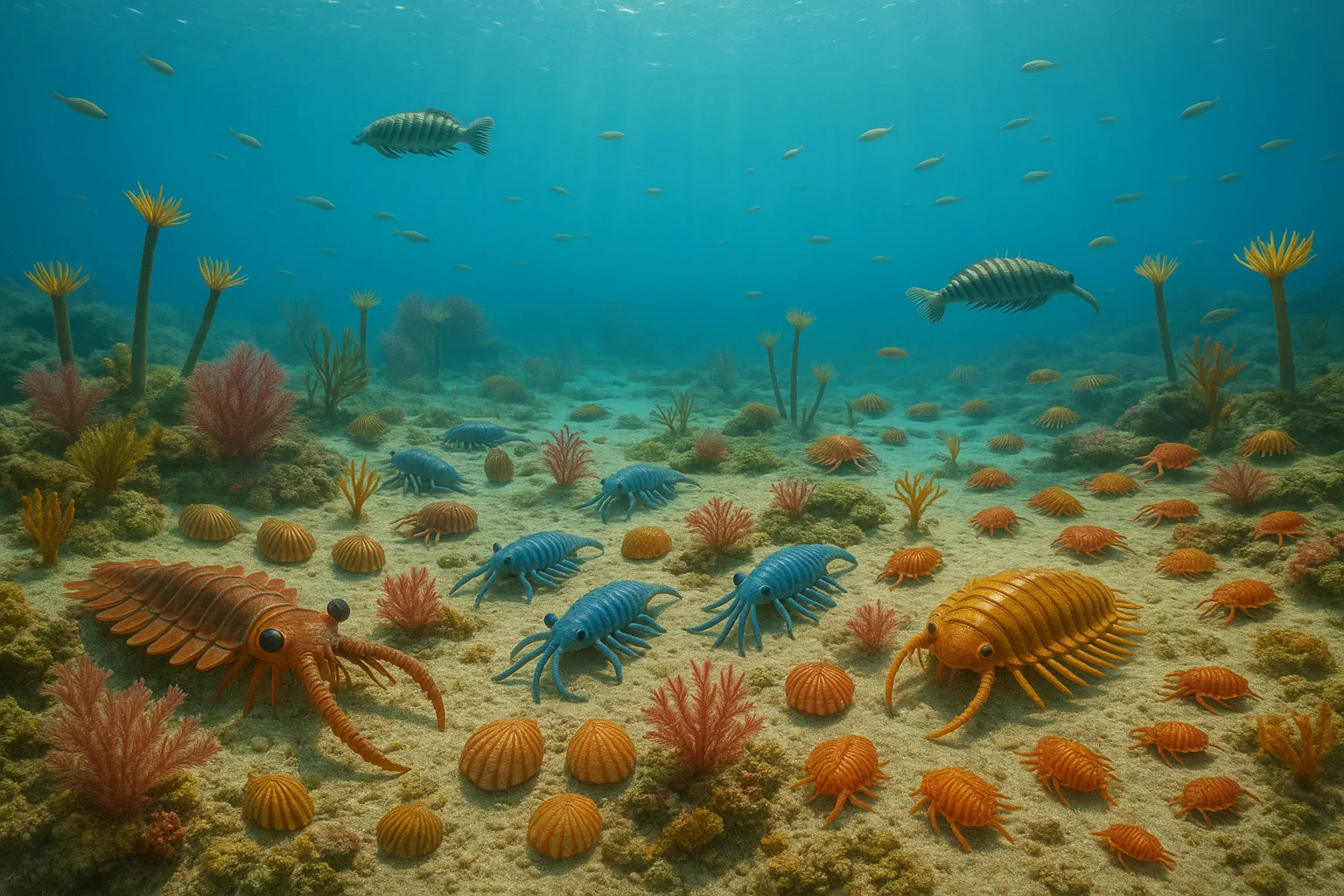 Example image based on the prompt shown on the left. The life forms resemble those of the Cambrian period, but
the amount of training data for this particular request does not seem to be sufficient to produce
a historically accurate image.
Example image based on the prompt shown on the left. The life forms resemble those of the Cambrian period, but
the amount of training data for this particular request does not seem to be sufficient to produce
a historically accurate image.
The resulting description looks, for example, like this:
Create a photorealistic image of a Cambrian seabed filled with diverse, colorful marine life, under clear blue water with soft sunlight filtering from above.
This GPT-4-generated prompt is then sent to the dall-e-3 model for image generation.
The API response contains a URL pointing to the generated image. The image is downloaded and stored in the output folder.
A separate image is produced for every subsection in the table of contents. The file names follow the pattern
{topic}-{subsection}.jpg and can subsequently be referenced directly in the HTML.
Finally, an HTML template is loaded and populated with the generated content. The template contains placeholders such as
{TOPIC}, {CONTENT} and {VERSION}, which are replaced with concrete values.
The finished article is then written as index.html or index.php into the output directory and is
ready to be used.
If you want to use the Ghostwriter script, you need an OpenAI API key. This key must be stored in the environment variable "OPENAI_API_KEY". Using GPT-4 is subject to a fee. OpenAI currently offers a one-time credit of 18 euros on registration, which can be used up. The cost of creating one article with images is in the cent range.
Download Ghostwriter script via GitHub
You need Python 3 to run the script. It can be started with the following command line:
python ./ghostwriter.py -t "The Rise of AI generated Content" -tmpl ./template.html -o ai_content| Parameter | Description |
|---|---|
| -t | The subject of the web page. This text should be in quotes. |
| -tmpl TEMPLATE | A text file (for example HTML or PHP) that provides the framework for the web page. The file must contain the placeholders {TOPIC}, {CONTENT} and optionally {VERSION}. These will be automatically replaced by the script with the headline, the HTML-formatted article and the script version number respectively. |
| -o OUTPUT | Output directory for the article. If this directory does not exist, a new one is created. |
| -s WRITING-STYLE | Optional: A text indicating the writing style. (e.g. "Carl Sagan", "National Geographic", "PBS" or "Drunken Pirate") |
| -v | Optional: If this flag is set, the script prints the GPT requests to the console. |

Learn how to create a colored version of the Siepinski-Triangle and many other fractals with recursive function calls.
Learn how to write Stellarium scripts with Typescript.
John Conway's Game of Life is a cellular automaton that shows how a simple set of rules can generate complex self replicating patterns.
A simple set of rules lets you simulate evolution on the hypothetical planet of wator.